Digital Diplomas & Certificates
A CERTIFIED ELECTRONIC CREDENTIAL OVERVIEW
Frederick Community College now offers digital diplomas and certificates! These are certified electronic credentials known as a CeDiploma or CeCertificate (CeDiploma/CeCertificate).
How to Access Your Digital Diploma or Certificate
You will receive an email with a link to download your credential when it is available from our trusted partner, CeCredentialTrust. To request a new download link, please use the CeCredential Trust site to resend invitation link.
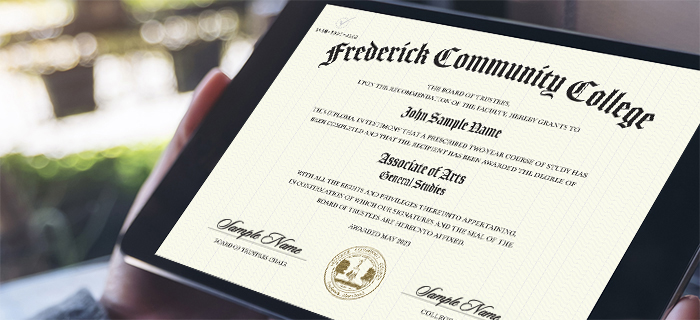
How to Access Your Digital Diploma or Certificate
You will receive an email with a link to download your credential when it is available from our trusted partner, CeCredentialTrust. To request a new download link, please use the CeCredential Trust site to resend invitation link.
The Benefits of Going Digital
IT'S A SECURE, VERIFIABLE AND OFFICIAL PDF YOU CAN SHARE!
- Employers love the CeDiploma! It is simple to read, easy to understand, and is directly validated by your institution in seconds.
- Enjoy unlimited sharing with family, friends, and employers. You can even share it on social media!
- Show instant proof of your education using Validation Services.
- Save the PDF on as many devices as you want.
- Enhance your resume by adding the CeDiD* and validation URL directly to it!
*CeDiD = a unique 12-digit Certified Electronic Document Identifier
Note:A credential may not be available for all conferral dates. For security reasons, the electronic credential cannot be printed.
For additional information about digital credentials, their features, trademarks and patents, please visit cecredentialtrust.com.
How to Use Credential Verification
- On your CeDiploma/CeCertificate there is a 12-digit code in the top corner called the Certified Electronic Document Identifier (CeDiD)
- Enter the CeDiD into the form and click validate to get a time and date-stamped validation of your Certified Electronic Credential.
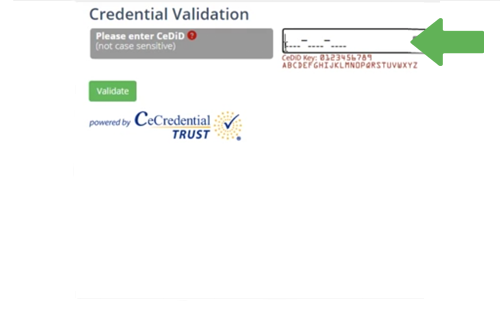
Enter CeDID
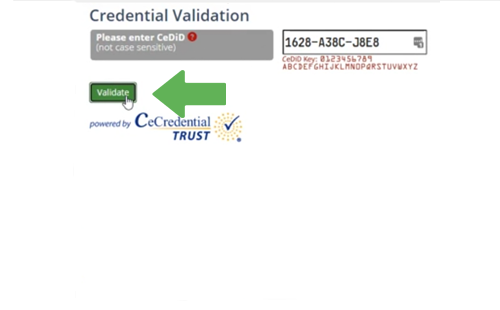
Click the Validate Button
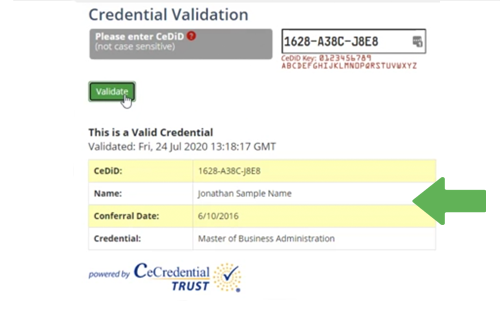
Validated Information is Displayed
More About CeCredentials
FEATURES
Learn more about the security features of a CeDiploma or CeCertificate
VALIDATION
Validate the authenticity of a CeDiploma or CeCertificate
FAQS
View commonly asked questions about the CeDiploma or CeCertificate
Contact
Tina Berry
Associate Registrar
graduation@frederick.edu
301.846.2655